Building & Managing Web Sites with
Microsoft Technologies
Lab 12 - Inserting records into a database using ASP
1.
Create the Project Directory/File
Open your child web on the class webserver and create a directory called "Lab12"
with a file called default.asp.
2. Create a Data Entry Form
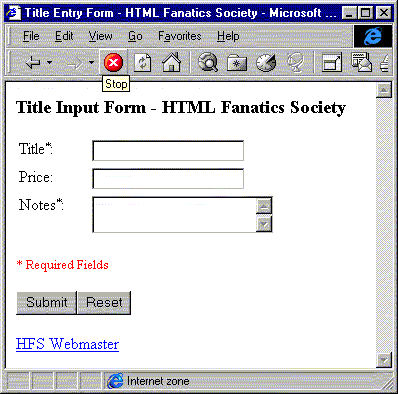
Create a form similar to the sample below. The form field names should be
"Title", "Price", "Notes". Use client-side form or field
validation as described in Lab 8.
3. Add ASP/ADO Code
Using the techniques described lectures, add code to this ASP page to insert the record
into the PUBS database on the Deathstar SQL Server. The page should alternate between
showing the data entry form and the result of the data entry (see previous examples). The page should
check the number of records inserted and report success to the user if the number of
records affected is 1, and failure otherwise. Use the following DSN to connect to
the database:
"Driver=SQL
    Server;Server=Deathstar;Database=Pubs;UID=student;pwd=student"
Review your work. ASK FOR HELP if you are stuck.
This lab will not be graded. However, you should definitely complete it to understand the next lecture and complete your group project.
[csc96b/_private/footer.htm]