Building & Managing Web Sites with
Microsoft Technologies
Lab 1 - HTML Review
Once you have created the HTML pages, review the source HTML to assess how you did.
Instructions:
In this lab we will recreate the home page and a topic page of a fictiucious web site at http://www.htmlfan.soc (shame on you if you just clicked there). Naturally, this site does not exist, yet. You'll have to make it by following the instructions below.
1. Create a directory called "wwwroot" on your computer for creating the lab
files.
Microsoft webservers commonly name the root directory of a web server
"wwwroot"
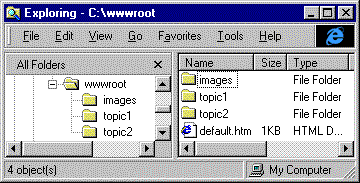
2. Create subdirectories called "images", "topic1", and
"topic2" in your "wwwroot" directory as shown below.
Most Microsoft web products use and/or create an "images" directory in
the root of your website.
3. Import the graphic below into the your "images" directory. Do this by
right-clicking on the graphic, selecting "Save Picture As...", and browsing to
your project directory.

4. Import the MS Word document below into the "topic1" directory by
right-clicking on the link and selecting "Save Target As...".
MS Word Document (19 KB)
5. Using ONLY Notepad, create a home page called
"default.htm" for your web site in the "wwwroot" directory.
Attempt to match the page below as closely as possible using HTML 3.2 standards.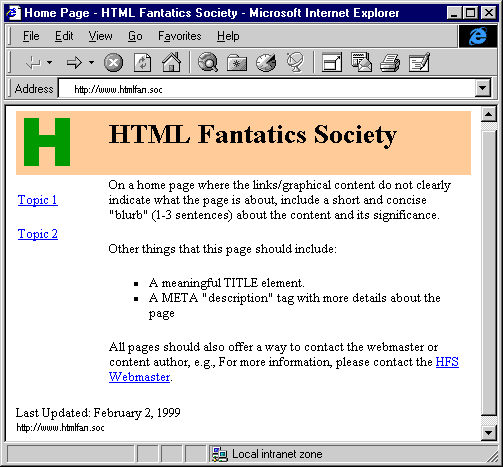
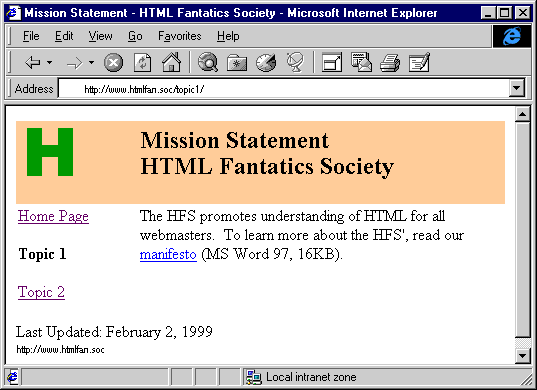
Create the page below as "default.htm" in the "topic1" directory
Notes and Hints:
- The Topic2 link should be an absolute link to Microsoft's home page (http://www.microsoft.com)
- The page is formatted into three areas using a <TABLE> element with the BORDER attribute set to 0
- The color code for the title bar is #FFCC99
- Use webmaster@htmlfan.soc as the email address
- If you are stuck, ASK FOR HELP!
Self-Assessment:
Here is the source HTML:
[csc96b/_private/footer.htm]